









Every RC pilot pays tuition. The only question is whether you pay it in foam, props and glue, or in a few evenings at the computer. We've watched a lot of first flights from the flight line, and the pattern is reliable: the pilots who put in sim time before their first flight look calm on takeoff, turn the plane without twisting their whole body, and land on purpose. The ones who didn't are usually talking about which part broke.
A simulator won't teach you everything. Wind on your face and a real battery timer feel different. But the hardest part of learning to fly is building reflexes, especially when the plane is coming toward you and left becomes right, and that part transfers well. Here's how to set up RealFlight Evolution and practice so the hours turn into skill instead of random crashing.
The Short Answer
Yes, a simulator helps, as long as you practice with a plan: fly a trainer in calm conditions from the default ground-level pilot view, run short sessions (15 to 30 minutes) built around one drill at a time, and only add wind once you can do five clean laps without hitting reset.
- Controller: the InterLink DX bundle is the easiest start; a Spektrum radio plus a WS3000T dongle lets you practice on your own transmitter.
- Drills that matter: ovals, figure-8s (the plane flies toward you every lap), the landing pattern, then crosswind landings.
- Ready to fly for real when sim landings are consistent and you no longer lose orientation on the inbound leg.
1. Set Up RealFlight Evolution the Right Way
Ten minutes of setup decides whether the sim feels like a toy or a trainer.
Pick your controller
RealFlight Evolution runs on a Windows PC through Steam. According to its Steam store page, it supports the Spektrum InterLink DX, compatible RC radios through an interface, or any 4-axis game controller. Our advice, in order:
- New pilots: the RealFlight Evolution with InterLink DX bundle. The InterLink is shaped like a real transmitter, with real gimbals, so your thumbs learn the right muscle memory.
- Already own a Spektrum radio: the software-only version plus a Spektrum WS3000T Wireless Simulator Dongle. Horizon lists the WS3000T as compatible with 6+ channel DSMX/DSM2 transmitters, so you practice on the exact radio you'll fly with.
- Gamepad: it works, but thumbsticks are short and springy. Use it in a pinch, not as your main trainer.
Check the system requirements first
Per Steam, the minimum is Windows 10 or 11, 4 GB of RAM, DirectX 11 graphics and 15 GB of storage. Eight GB and a discrete graphics card are recommended. Most recent laptops are fine. A Chromebook or Mac without Windows is not.
Calibrate and confirm your stick mode
Run the controller calibration before your first flight, moving every stick to its full corners. Then confirm the sim matches the stick mode you'll use at the field. In the US that's almost always Mode 2 (throttle and rudder on the left stick). If you calibrate badly, the plane will drift or turn on its own and you'll blame your thumbs.
Use the pilot's view, not the chase cam
Chase views are fun but they teach the wrong skill. At the field you stand in one spot and the plane flies around you. Keep the ground-level view so you learn to read a small plane's attitude at a distance.
2. A Practice Plan That Builds Real Skill
Random flying builds random habits. Use short sessions, one drill per session, and a clear goal before you move on.
Choose a trainer and keep it
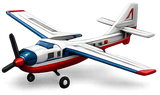
RealFlight Evolution includes a large fleet; RealFlight lists more than 300 aircraft and over 75 flying sites. Ignore most of them for now. Pick a high-wing trainer that looks and flies like a real beginner plane and fly only that until you can land it on demand. Swapping planes every five minutes resets your progress.
Start with zero wind, then add it on purpose
Turn the wind off for your first sessions. When ovals feel easy, add light wind (around 5 mph), then 8 to 10 mph with some crosswind. Most Atlanta evenings aren't dead calm, so practicing in wind matters. Just add it after the basics, not before.
The session-by-session plan
Fly 15 to 30 minutes at a time. Stop while you're still sharp. Tired practice is how bad habits get in.
| Session | Sim setup | Drill | Move on when |
|---|---|---|---|
| 1-2 | Trainer, calm wind, big grass field | Takeoff, climb, wide left and right ovals in front of you | Five laps without a reset |
| 3-4 | Same plane, light wind (about 5 mph) | Figure-8s centered on you, so the plane flies toward you every lap | You stop turning your body to "steer" |
| 5-6 | Same plane, light wind | Landing pattern: downwind, base, final, throttle back, flare | Three landings in a row on the runway |
| 7-8 | Wind 8-10 mph, some crosswind | Crosswind takeoffs and landings, low passes | Landings are boring, which is the goal |
| 9+ | Plane that matches your real one | Full "flight" from takeoff to landing on a timer | You land before the timer, every time |
Treat every crash like a debrief
Before you hit reset, say out loud what happened. "Turned the wrong way coming toward me." "Too slow on final." "Didn't add throttle in the turn." Naming the mistake is how you stop repeating it. RealFlight's Virtual Flight Instructor lessons and challenges are useful for structure too; use them as a second opinion on your drills.

3. From Sim to Field: When You're Ready and How to Bridge the Gap
The simulator gets your thumbs ready. The field adds wind you can feel, real batteries and real consequences.
Signs you're ready
- You can fly ten laps of figure-8s without losing track of which way the plane is banked.
- You land three times in a row on the runway, into the wind, at a sensible speed.
- When something surprises you, your first move is to add altitude, not to yank the sticks.
Match the sim to your real plane
Once you've chosen your first real airplane, fly the closest match in the sim. Some RTF trainers ship with a simulator in the box: Horizon's listing for the HobbyZone AeroScout S 2 1.1m RTF Basic includes RealFlight Trainer Edition (Horizon Hobby). If your plane has SAFE, remember that the sim won't always behave like SAFE Beginner mode. Practice without help so the training wheels are a bonus, not a crutch.
Keep the sim after your first flight
The sim is even more useful after you've flown for real. Rehearse the thing that scared you at the field, like a crosswind landing, a dead-stick glide or flying downwind fast, twenty times on the couch. Quarterly content packs such as the RealFlight Evolution 2026 Quarterly Content Pack 2 add new aircraft when you're ready to try something different.
Your first real flights
Fly at a club field or a big open area, in light wind, and follow the AMA Safety Code (range check, clear flight line, no flying over people). Recreational pilots also need to pass the FAA's free TRUST test. Our guide to RC plane rules covers registration and Remote ID. If you can, fly your first flights with an experienced pilot nearby.
Conclusion
RealFlight Evolution is the cheapest crash you'll ever have. Set it up with a real transmitter-style controller, fly the pilot's view, keep one trainer, and work through short drills: ovals, figure-8s, the landing pattern, then wind. When landings get boring in the sim, you're ready to make them boring at the field too.
Shop flight simulators and RC airplanes, or stop by the store and we'll show you the sim, help pick a first plane, and point you to our flight training.
Gear Mentioned in This Guide

RealFlight Evolution RC Flight Simulator with InterLink DX Controller
Software plus a transmitter-style controller. The easiest way to start.
Shop now
RealFlight Evolution Simulator (Software Only)
For pilots who already own a Spektrum radio or a controller.
Shop now

HobbyZone AeroScout S 2 1.1m RTF Basic
The do-it-all field trainer. Needs a 3S battery and charger.
Shop now
Frequently Asked Questions
Does an RC flight simulator actually help?
Yes. The hardest beginner skill is orientation, especially when the plane flies toward you and the controls feel reversed. A simulator lets you repeat that hundreds of times with no repair bill. It does not replace real wind and real batteries, but it shortens the learning curve.
Which RealFlight settings should beginners use?
Pick one high-wing trainer, fly from the ground-level pilot's view, turn wind off for the first sessions, and calibrate your controller with the correct stick mode (usually Mode 2 in the US). Add light wind once you can fly five clean laps.
Can I use my own Spektrum transmitter with RealFlight?
Yes. A wireless dongle such as the Spektrum WS3000T works with 6+ channel DSMX/DSM2 Spektrum transmitters. You bind it like a receiver and the sim reads your sticks.
How long should I practice before my first real flight?
Go by skill, not hours. When you can fly figure-8s without losing orientation and land three times in a row, you're ready for a calm-day first flight.
Will RealFlight run on a Mac?
RealFlight Evolution is a Windows program delivered through Steam. Steam lists Windows 10 or 11 as the minimum, so a Mac needs a Windows setup to run it.
Is a gamepad good enough for RealFlight?
It works, but short, springy thumbsticks don't build the same feel as transmitter gimbals. Use the InterLink DX or your own radio for serious practice.
Sources and Further Reading
- Steam: RealFlight Evolution store page (features and system requirements)
- RealFlight: RealFlight Evolution overview
- Horizon Hobby: RealFlight Evolution with InterLink DX (RFL2000)
- Horizon Hobby: Spektrum WS3000T Wireless Simulator USB Dongle
- Horizon Hobby: AeroScout S 2 1.1m RTF Basic with SAFE and RealFlight (HBZ380002)
- Academy of Model Aeronautics: Safety Code


